
Welding Simulator Roblox MIG Welding Guide (2026)
MIG in Welding Simulator on Roblox: booth setup, helmet and mouse controls, sliders, and bead technique from Jacob Jordan gameplay footage.
FAQ
How do you start a MIG weld in Welding Simulator?
Does MIG have voltage and wire speed controls?
Can you rotate the MIG torch while welding?
What torch paths fail MIG grading?
How do multi-pass MIG jobs work?
Is 6G pipe welding available in MIG?
What is MIG in Welding Simulator on Roblox?
MIG is the first weld method Ice Panda Studios describes on Roblox (27 tasks, “stack of dimes” bead look in the official game description, API read 2026-10-19). Stick and TIG exist in the same game but stay locked on the Job Board until you advance in MIG in the videos we watched (beginner guide). This page covers controls and technique from Jacob Jordan’s PC sessions, not every job payout or in-game shop upgrade.
What does the job panel tell you before you weld?
In Jacob Jordan’s October 16, 2026 video, the coupon panel names joint types such as butt joint and lap joint and lists plate thickness (for example 1/8 in mild steel on a practice coupon). A settings checklist on jobs mentions wire feed, voltage, and shielding gas supplied (about 1:01). Those lines confirm the sim models gas-shielded MIG setup even though Roblox marketing text never spelled out sliders until gameplay footage appeared.
We do not quote chart-line numbers from the coupon UI (voltage, wire speed, amperage hints). Sliders exist, but we have not cross-verified an official tuning table per job.
How do you set up the booth and helmet?
Footage shows Press H to drop your helmet while a checklist item flips from FIX Helmet down to OK when you comply (October 16, 2026, about 1:00). The same session labels Retry / Reset on R and Finish Weld or Finish + Inspect on F during MIG.
Before striking an arc, align the checklist greens: wire speed matches metal, voltage matches wire speed, and shielding gas flowing appear as separate OK lines in the October 16, 2026 practice coupon UI.
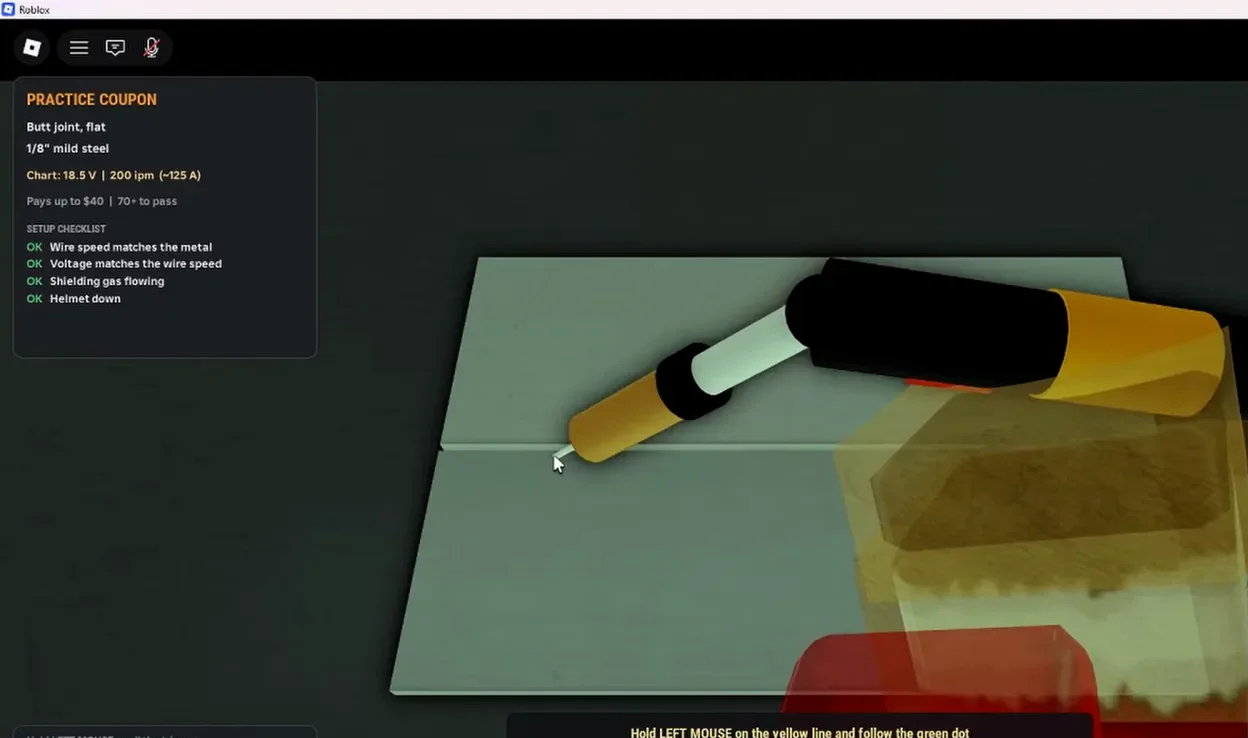 Frame from Jacob Jordan’s “Real WELDER tries Welding Simulator” (YouTube, October 16, 2026), 1:30. Cropped to remove a picture-in-picture camera feed.
Which controls matter during the bead?
MIG controls from Jacob Jordan’s October 16, 2026 video include:
- Hold left mouse on the yellow line and follow the green dot (about 1:31).
- On-screen labels for movement speed, torch guidance, and scroll (or Q/E) to adjust torch height / wire stick-out (1:31–2:01).
- Rotate the torch while welding to choose push vs pull travel (2:31–3:01).
- A/D to rotate the gun and Z/C to rotate the plate on the control card shown in the same session.
While the arc runs, that session also shows a Travel Speed meter, Stick-Out readout, and Joint Welded progress bar during active MIG. In the October 19, 2026 video, another segment around 2:00 labels Travel Speed, Work Angle, and Travel Angle on a different HUD layout; see the metric table on /guides/grading-guide/ instead of assuming one layout.
 Frame from Jacob Jordan’s “Real WELDER tries Welding Simulator” (YouTube, October 16, 2026), 3:40. Cropped to remove a picture-in-picture camera feed.
Stay inside the green zones when the HUD shows them. Commentary about gas coverage is the creator’s opinion, not an official tooltip string.
What movement patterns should you avoid?
Later in the October 16, 2026 video (about 20:20–21:20), the player reports that zigzag, circle, and back-and-forth torch paths are rejected, while straight dragging along the guide succeeds. Treat that as one creator’s note until another source confirms it on the post-update build.
Spoken lists in both videos mention many MIG job names (examples include stitch, spot, crack repair, square patch, wavy seam, multi-pass, pipe saddle, horizontal/vertical seam, and 1G–4G pipe). Those names overlap between videos but are not an official 27-row table from Roblox; do not treat them as complete or ordered.
How do multi-pass and pipe jobs differ?
Jacob Jordan’s October 19, 2026 video (about 13:15–14:45) shows multi-pass MIG as three beads side-by-side, explicitly not stacked layers. That differs from how some real-world multipass plates are taught, but it matches what that clip demonstrates.
Both videos agree 6G pipe position is not offered; narrators call out the missing 6G label. Ice Panda may add positions later; we only record absence in these two sources.
How does MIG scoring connect to cash and badges?
When you press F to inspect, the Weld Inspection UI shows a letter grade and score out of 100 (for example A with 96/100 PASSED in October 16, 2026 footage). Metric bars on that screen change between clips; see /guides/grading-guide/ instead of assuming one layout.
Roblox badges (2026-10-19 API) tie letters to milestones: first weld C or better (Certified Welder), a B weld (Skilled Welder), and a perfect A (Master Welder). The Steady Hands game pass official text says your torch wobbles way less, welds come out straighter and cleaner, and better welds = better grades = more cash (Roblox product-info, 2026-10-19; summarized on /items/game-passes/).
Income multipliers (2x Cash, 3x Cash, VIP, Rush Hour) are documented from Roblox product-info on /items/game-passes/. Stacking rules remain unstated officially.
Sources and what we could not verify
Sources used
- Roblox game description (read 2026-10-19): MIG as 27-task mode with stack-of-dimes wording; Stick and TIG listed separately.
- Jacob Jordan, “Real WELDER tries Welding Simulator” (2026-10-16): joint labels, checklist gas and wire copy, H/F/R prompts, yellow line and green dot control, speed and stick-out HUD, torch rotation, zigzag failure commentary, Voltage/Wire/Gas sliders, job name shout list segment.
- Jacob Jordan, “Real WELDER tries Welding Simulator Again!” (2026-10-19): multi-pass three-bead layout, repeated 6G absence, extended job name list overlap, Travel Speed / Work Angle labels around 2:00.
- Roblox badges and Steady Hands pass text (read 2026-10-19).
- Welding Simulator on Roblox.
Still unverified for MIG
- Recommended numeric voltage, wire speed, gas flow, or travel speed targets per material (sliders exist; tuning table does not).
- Letter or numeric cutoffs for ranks beyond on-screen examples.
- Full 27-job order, payouts, and unlock requirements.
- Whether October 18, 2026 balance changes altered checklist text or HUD labels.
- Mobile MIG controls (not shown in the videos we watched).
- Game pass stacking and exact cash formulas per weld.
Related pages: /guides/beginner-guide/, /guides/grading-guide/, /codes/welding-simulator-codes/, /faq/, /about/.
Related Articles
codes
Welding Simulator Roblox Codes — October 2026
As of 2026-10-19 there are no verified active codes for Ice Panda Studios' Welding Simulator on Roblox. This page tracks what we check and how we update.
guides
Welding Simulator Roblox Beginner Guide (2026)
Start Welding Simulator on Roblox: reach a booth, use the Job Board, drop your helmet, and finish MIG jobs. Based on gameplay videos and Roblox listings.
guides
Welding Simulator Roblox Grading Guide (2026)
Weld grading in Welding Simulator on Roblox: inspection screens, letter scores, Roblox badges, and failure reasons from Jacob Jordan gameplay footage.
Was this helpful?
Thanks for the feedback!